Your earbuds can sound noticeably quieter long before the battery wears out. In many cases, the culprit is a thin layer of earwax, skin oil, pocket lint, or makeup over the speaker mesh. Learning how to clean wireless earbuds correctly restores clearer sound without risking the tiny drivers, microphones, or charging contacts inside.
The key is restraint. Wireless earbuds are built for sweat and daily wear, but they are not designed to be soaked, rinsed under a faucet, or scrubbed with anything sharp. A careful five-minute cleaning routine is usually all they need.
What You Need Before You Start
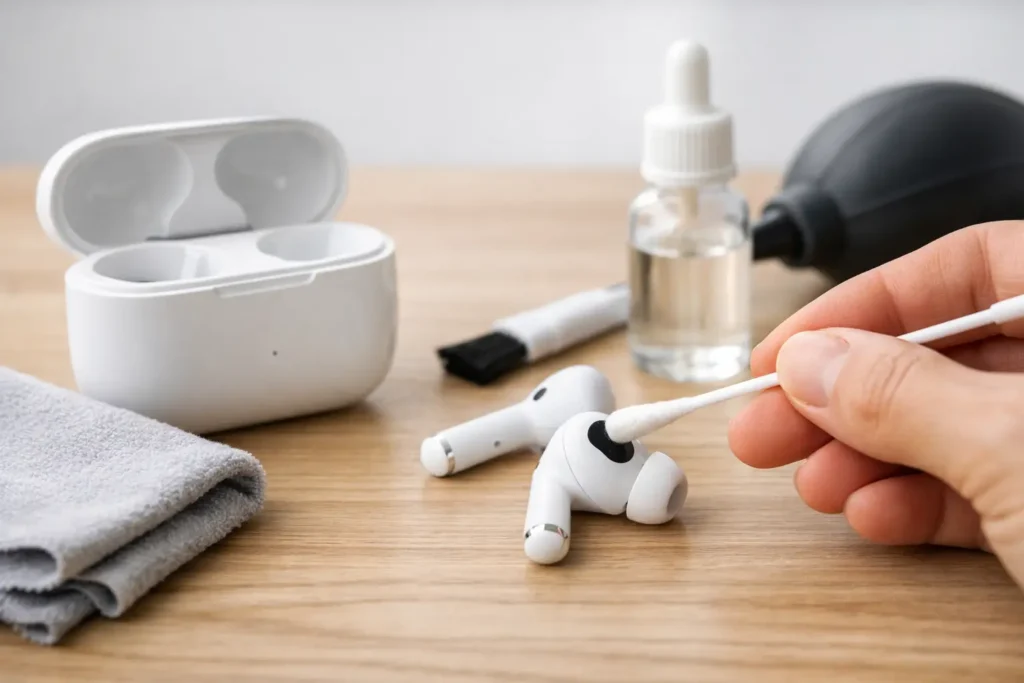
Set your earbuds aside from their charging case and make sure they are not charging. You do not need a specialty kit for routine maintenance. A clean, dry microfiber cloth, a soft dry brush, cotton swabs, and a small amount of 70% isopropyl alcohol are enough for most pairs.
If your earbuds have removable silicone ear tips, keep a small bowl of warm water and mild dish soap nearby for those pieces only. Never use water on the earbud body, speaker openings, or charging case.
Avoid toothpicks, pins, paper clips, and metal tools. They may lift visible wax, but they can also puncture the delicate mesh that protects the speaker. Compressed air is not a great shortcut either. Its force can push debris farther into the mesh or into microphone ports.
How to Clean Wireless Earbuds Step by Step
1. Remove the ear tips, if your earbuds have them
Gently pull off each silicone tip and inspect both sides. Earwax often collects inside the narrow channel, where it can restrict sound even when the outer surface looks clean.
Wash the tips in warm water with a drop of mild dish soap. Rub them gently between your fingers, rinse thoroughly, and set them on a clean towel to air-dry completely. Do not put them back on until there is no moisture inside or outside the tips.
Foam ear tips need a different approach. Most should not be washed because water can break down the material and affect their fit. Wipe foam tips lightly with a dry cloth or follow the earbud maker’s care instructions. If they stay discolored, stiff, or misshapen, replacement tips are the smarter option.
2. Brush the speaker mesh while it is dry
Hold each earbud with the speaker opening facing downward. This position matters because loosened debris can fall out rather than deeper into the earbud.
Use a soft, clean brush to sweep across the mesh with light strokes. A dry, soft-bristled toothbrush used only for electronics can work well, though a small camera lens brush offers more control. Do not press hard. The goal is to lift surface buildup, not force it through the screen.
If you can still see wax in the mesh, wrap a small amount of microfiber cloth around your fingertip and wipe lightly. Work slowly. It is better to repeat gentle passes than to solve the problem with one aggressive scrape.
3. Clean the exterior with a barely damp swab
Skin oils build up along the stem, touch controls, and areas that sit against your ear. Dampen a cotton swab with 70% isopropyl alcohol, then squeeze or blot it so it is just slightly moist, never dripping.
Wipe the hard plastic exterior, avoiding speaker grilles, vents, and microphone holes. Alcohol evaporates quickly and is useful for lifting oils, but more is not better. Do not pour alcohol directly onto the earbuds or use household disinfecting sprays.
For touch-sensitive earbuds, use especially light pressure. A microfiber cloth is often enough for the broad outer surfaces, while the swab helps around seams and contours.
4. Clear microphone and vent openings carefully
Small openings on an earbud do more than you might think. Microphone ports support calls and noise cancellation, while vents help regulate pressure and sound. Blocking them with wax or lint can lead to muffled calls, uneven noise cancellation, or a strange plugged-ear feeling.
Use the dry soft brush around these openings. Keep the earbud facing downward and do not insert anything into the ports. If debris appears packed in or your call quality remains poor after gentle cleaning, it may be time for professional support rather than more force at home.
5. Wipe the charging contacts
Look for the small metal contact points on each earbud. When oil or residue coats them, charging can become inconsistent even if the case has power.
Use a dry microfiber cloth first. If residue remains, use a nearly dry alcohol-dampened cotton swab and wipe the contacts gently. Let them air-dry for several minutes before placing the earbuds back in the case.
Clean the Charging Case Without Creating a Bigger Problem
The charging case tends to collect pocket lint, dust, and crumbs, especially around the lid hinge and earbud wells. Start by turning the case upside down over a clean surface and tapping it gently. Then use a dry soft brush to loosen debris around the wells.
For the exterior, a microfiber cloth handles fingerprints and everyday grime. A lightly alcohol-dampened swab can clean the rim, hinge area, and the plastic around the charging slots. Keep moisture away from the charging port and the pins or contact plates inside each well.
Do not use water, a wet wipe that leaves the surface soaked, or a damp cloth inside the case. Since the case stores a battery and electrical contacts, trapped liquid can cause corrosion or charging issues that are much harder to fix than routine grime.
If lint is wrapped around the charging pins, brush around it gently. Never pry at pins with a metal object. Bent or damaged pins can prevent the earbuds from charging, and that repair is rarely a simple DIY job.

How Often Should You Clean Your Earbuds?
It depends on how often you wear them and where you use them. For most people, a quick wipe once a week and a more careful mesh-and-case clean every two to four weeks is a realistic routine.
Clean more often if you use earbuds for workouts, wear them during long commutes, share them with someone else, or notice lower volume in one earbud. Earwax naturally varies from person to person, so a frequent listener may need attention every few days while another can go weeks without buildup.
A quick post-workout wipe is worthwhile. Let the earbuds dry fully after exercise before returning them to the case. Closing damp earbuds inside a case traps moisture where you least want it.
Common Cleaning Mistakes That Can Ruin Earbuds
The biggest mistake is treating earbuds like washable accessories. Even models with water-resistance ratings have limits, and that rating may apply to the earbuds but not the charging case. Sweat resistance does not mean safe for a sink rinse.
Another common issue is using too much cleaning liquid. A cotton swab that looks wet can release enough fluid to seep behind a grille or into a seam. Use minimal moisture and allow time to dry before charging.
Finally, resist the urge to use sharp tools on stubborn wax. If the speaker mesh looks permanently blocked, sound stays weak after gentle cleaning, or an earbud makes crackling noises, replacement or manufacturer service may be more sensible. A damaged mesh can turn a minor maintenance issue into a permanent sound problem.
Keep Cleaning From Becoming a Big Job
Store your earbuds in their case instead of loose in a pocket or bag, where lint reaches the case and speaker openings fast. Wipe them after sweaty sessions, and check the ear tips whenever you notice a change in fit or sound.
A clean pair of earbuds is not just more pleasant to use. It helps preserve the sound, call quality, and charging reliability you paid for. A few gentle habits will do more for their lifespan than any aggressive cleaning tool ever will.